File:Fallback system.webp: Difference between revisions
From VRChat Wiki
A VRChat graphic, demonstrating the Fallback Avatar System. Alt-text: "Fallback Avatar System". No Quest version of your Avatar? -You can pick an Avatar to replace the Robot on Quest. -Your Fallback is scaled to match your size. Menu -> Avatars -> Change Quest to choose your Fallback. People on Quest will see that avatar instead of a gray robot. Source: https://medium.com/vrchat/vrchat-on-quest-avatar-performance-woes-1a3cc228a442 |
m →Summary: Added secondary source. |
||
| Line 5: | Line 5: | ||
Source: https://medium.com/vrchat/vrchat-on-quest-avatar-performance-woes-1a3cc228a442 | Source: https://medium.com/vrchat/vrchat-on-quest-avatar-performance-woes-1a3cc228a442 | ||
Secondary source: https://docs.vrchat.com/docs/vrchat-202115 | |||
== Licensing == | == Licensing == | ||
{{license_VRC}} | {{license_VRC}} | ||
Latest revision as of 20:26, 16 September 2025
Summary
A VRChat graphic, demonstrating the Fallback Avatar System.
Alt-text: "Fallback Avatar System". No Quest version of your Avatar? -You can pick an Avatar to replace the Robot on Quest. -Your Fallback is scaled to match your size. Menu -> Avatars -> Change Quest to choose your Fallback. People on Quest will see that avatar instead of a gray robot.
Source: https://medium.com/vrchat/vrchat-on-quest-avatar-performance-woes-1a3cc228a442 Secondary source: https://docs.vrchat.com/docs/vrchat-202115
Licensing

File history
Click on a date/time to view the file as it appeared at that time.
| Date/Time | Thumbnail | Dimensions | User | Comment | |
|---|---|---|---|---|---|
| current | 20:18, 16 September 2025 | 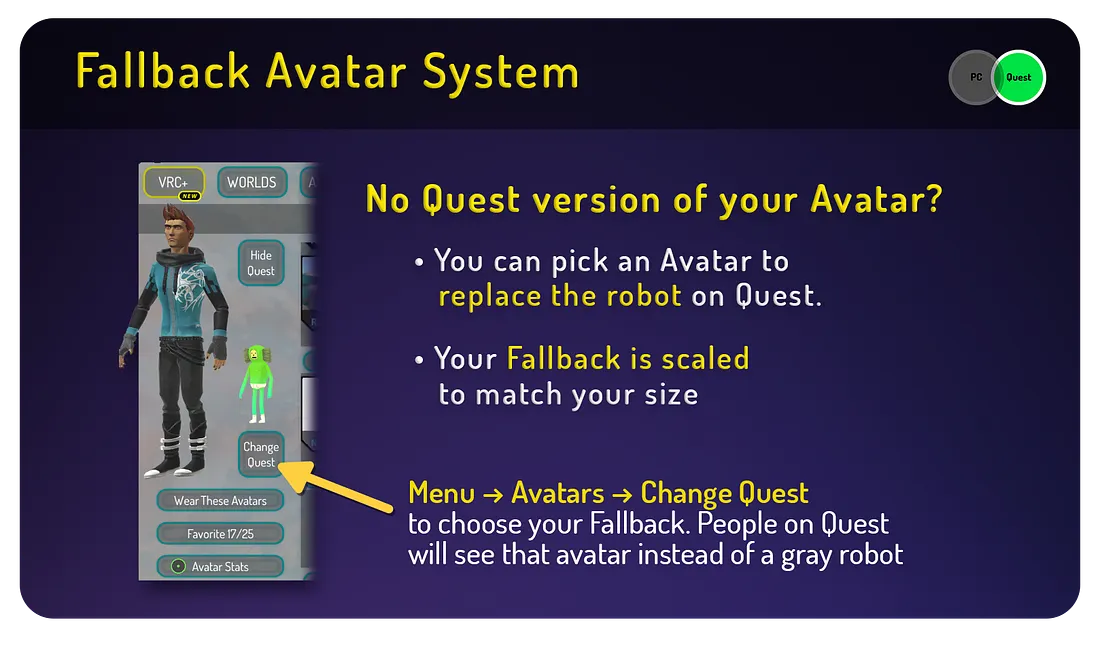 | 1,100 × 645 (51 KB) | DAG-XR (talk | contribs) | A VRChat graphic, demonstrating the Fallback Avatar System. Alt-text: "Fallback Avatar System". No Quest version of your Avatar? -You can pick an Avatar to replace the Robot on Quest. -Your Fallback is scaled to match your size. Menu -> Avatars -> Change Quest to choose your Fallback. People on Quest will see that avatar instead of a gray robot. Source: https://medium.com/vrchat/vrchat-on-quest-avatar-performance-woes-1a3cc228a442 |
You cannot overwrite this file.
File usage
The following page uses this file:



