Translations:Getting Started/53/ko: Difference between revisions

From VRChat Wiki
yujֺin (talk | contribs)
No edit summary
ΗARE (talk | contribs)
No edit summary
 
Line 1: Line 1:
== UI 언어 변경==
== UI 언어 변경 ==
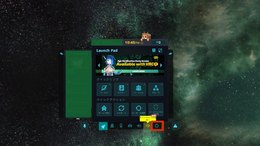
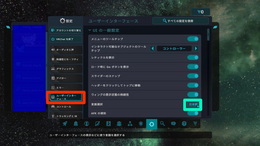
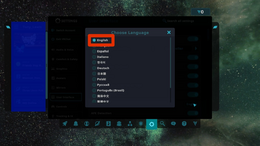
VRChat이 이해하지 못하는 언어로 설정되어 있다면 다음 과정을 통해 언어를 변경할 수 있습니다:
* 아이콘을 사용하여 클릭해야 할 버튼을 확인할 수 있습니다.

Latest revision as of 11:25, 6 November 2026

Information about message (contribute)
This message has no documentation. If you know where or how this message is used, you can help other translators by adding documentation to this message.
Message definition (Getting Started)
== Change UI Language ==
If VRChat is set to a language you don't understand, you can use the following process to change it:
*The icons can be used to identify which button to click.
<gallery widths="260" heights="150">
File:How to change UI Language1.webp|1. Open Quick Menu and '''Double Click''' on the '''Gear''' Icon.
File:How_to_change_UI_Language2.webp|2. Select the category '''between the mirror and gamepad symbols''' to navigate to the User Interface category, and click the button '''highlighted by the Green Circle'''.
File:How_to_change_UI_Language3.webp|3. Select '''English''' or your '''preferred language'''.
</gallery>Additionally, you can change your language setting on the '''login screen'''.

UI 언어 변경

VRChat이 이해하지 못하는 언어로 설정되어 있다면 다음 과정을 통해 언어를 변경할 수 있습니다:

  • 아이콘을 사용하여 클릭해야 할 버튼을 확인할 수 있습니다.

또한 로그인 화면에서 언어 설정을 변경할 수 있습니다.