Creator Economy: Difference between revisions
nekochanfood (talk | contribs) m Change the Japanese Yen Symbol to `¥` |
formatting |
||
| (40 intermediate revisions by 14 users not shown) | |||
| Line 1: | Line 1: | ||
{{ | <languages/> | ||
{{Noticebox/Official}} | |||
<translate> | |||
<!--T:1--> | |||
'''Creator Economy''' is a service introduced to VRChat offering users to purchase “VRChat Credits” to support their favorite creators. Creators may also set up a store, if they apply to the Creator Economy Program, and are accepted. All transactions are powered by VRChat's partner, [https://www.thunes.com/tilia/ Thunes], formerly Tilia. | |||
This service was teased during VRChat's [https://youtu.be/QBQnCxtDaso? | <!--T:2--> | ||
This service was teased during VRChat's [https://youtu.be/QBQnCxtDaso?t=5563 Developer Steam] in April 2021, and its initial testing period was launched to [[Special:MyLanguage/Open Beta|Open Beta]] starting on {{Date|November 22nd, 2023}} and finally released publicly on {{Date|November 30, 2023}}<ref>[https://docs.vrchat.com/docs/vrchat-202342 VRChat Release 2023.4.2] from November 30, 2023.</ref>. | |||
== | == VRChat Credits == <!--T:3--> | ||
{{credits}} VRChat Credits ''(symbolized by a '''\V''' symbol in plaintext)'', VRC Credits, or simply ''''credits'''<nowiki/>', are | </translate> | ||
[[File:Icons Credits.png|thumb|128x128px|<translate><!--T:4--> VRChat Credits icon</translate>]] | |||
<translate> | |||
<!--T:5--> | |||
{{credits}} VRChat Credits ''(symbolized by a '''\V''' symbol in plaintext)'', VRC Credits, or simply ''''credits'''<nowiki/>', are digital currency offered to VRChat users to exchange with other VRChat creators for perks. VRChat Credits can be purchased through the Steam Store, Meta Store, or Google Play Store. | |||
=== | === Purchasing === <!--T:6--> | ||
</translate> | |||
[[File:Purchasingscreen.png|thumb|316x316px|<translate><!--T:7--> VRChat Credits Menu (USD)</translate>]] | |||
<translate> | |||
<!--T:8--> | |||
Users can purchase VRChat Credits by opening up their [[Special:MyLanguage/Main Menu|Main Menu]] or [[Special:MyLanguage/Quick Menu|Quick Menu]], and clicking the '''Wallet''' button in the top right corner. | |||
<!--T:9--> | |||
There are 9 different VRChat Credits Bundles that can be purchased, ranging from {{credits|600}} to {{credits|12,000}}. From there, the user must have sufficient funds available to use on the Steam Store, or Meta Store, depending on where the credits are being purchased from. After completing the transaction, credits will immediately be applied to your account. | |||
==== VRChat Credits Bundles ==== <!--T:10--> | |||
</translate> | |||
{| class="wikitable sortable" | |||
!<translate><!--T:11--> {{credits}} VRChat Credits</translate> | |||
!<translate><!--T:12--> | |||
Value | |||
($USD)</translate> | |||
!<translate><!--T:13--> Image</translate> | |||
|- | |||
|600 | |||
|{{formatnum:4.99}} | |||
|[[File:VRChatCreditBundle_600.png|96px]] | |||
|- | |||
|{{formatnum:1,200}} | |||
|{{formatnum:9.99}} | |||
|[[File:VRChatCreditBundle_1200.png|96px]] | |||
|- | |||
|{{formatnum:2,400}} | |||
|{{formatnum:19.99}} | |||
|[[File:VRChatCreditBundle_2400.png|96px]] | |||
|- | |||
|{{formatnum:3,000}} | |||
|{{formatnum:24.99}} | |||
|[[File:CreditBundle 3000.png|96x96px]] | |||
|- | |||
|{{formatnum:3,600}} | |||
|{{formatnum:29.99}} | |||
|[[File:VRChatCreditBundle_3600.png|96px]] | |||
|- | |||
|{{formatnum:4,800}} | |||
|{{formatnum:39.99}} | |||
|[[File:VRChatCreditBundle_4800.png|96px]] | |||
|- | |||
| {{formatnum:6,000}} | |||
|{{formatnum:49.99}} | |||
|[[File:VRChatCreditBundle_6000.png|96px]] | |||
|- | |||
|{{formatnum:9,000}} | |||
|{{formatnum:74.99}} | |||
|[[File:VRChatCreditBundle_9000.png|96px]] | |||
|- | |||
|{{formatnum:12,000}} | |||
|{{formatnum:99.99}} | |||
|[[File:VRChatCreditBundle_12000.png|96px]] | |||
|} | |||
<translate> | |||
<!--T:14--> | |||
''*Purchasing credits may include Value-Added Tax (VAT)<ref>{{VRC link|https://hello.vrchat.com/blog/euro-price-vat-change |European Pricing Update for VRChat Plus/Credits}} from 24 May, 2024</ref>'' | |||
<!--T:15--> | |||
=== Spending === | |||
Users can spend their VRChat Credits on the {{VRC link|https://vrchat.com/home/marketplace/welcome |website}}, or in the client, through either, the [[Special:MyLanguage/Shop|Shop]], or [[Special:MyLanguage/Avatars|avatar]], [[Special:MyLanguage/Groups|group]], or [[Special:MyLanguage/Worlds|world]] stores. Users can buy a listing or a subscription with their VRChat Credits, each listing and subscription has products attached to them, these are ''in layman's terms'' the benefits you receive from the listing or subscription. | |||
<!--T:16--> | |||
The '''Spotlight''' section of the Marketplace tab offers suggestions of worlds and groups that are currently enrolled in the Creator Economy Program. | |||
<!--T:17--> | |||
For more creator-related information, see the Creator Economy documentation<ref>{{VRC link|https://creators.vrchat.com/economy/|Creator Economy Documentation}} from 24 May, 2024</ref>''.'' | |||
<!--T:18--> | |||
==== Stores ==== | |||
Stores are where users can buy content with VRChat Credits. There are 3 types of stores: | |||
</translate> | |||
{| class="wikitable" | {| class="wikitable" | ||
! | !<translate><!--T:19--> Stores</translate> | ||
! | !<translate><!--T:20--> Description</translate> | ||
! | |||
|- | |- | ||
| | |<translate><!--T:21--> Avatar Marketplace</translate> | ||
| | |<translate><!--T:22--> Users can find all public avatar listings here. Located on the Avatar page, in the explore tab.</translate> | ||
| | |- | ||
|<translate><!--T:23--> World</translate> | |||
|<translate><!--T:24--> Located on a world page, in the store tab. Users can buy content for the world they're in, or avatar listings.</translate> | |||
|- | |||
|<translate><!--T:25--> Group</translate> | |||
|<translate><!--T:26--> Located on a group page, in the store tab. Users can buy subscriptions that could grant them content without various worlds or a group role.</translate> | |||
|} | |||
<translate> | |||
<!--T:27--> | |||
==== Listings ==== | |||
Listings are what users can buy from stores. While listings can be anything the creator decides, users can expect to see common types of listing such as: Unlocking new areas of a world, customization options, and more. | |||
<!--T:28--> | |||
There are 3 types of listings creators can offer, each type has a different duration type. | |||
</translate> | |||
{| class="wikitable" | |||
!<translate><!--T:29--> Listing</translate> | |||
!<translate><!--T:30--> Duration</translate> | |||
!<translate><!--T:31--> Description</translate> | |||
|- | |||
|<translate><!--T:32--> Instant</translate> | |||
|<translate><!--T:33--> None</translate> | |||
|<translate><!--T:34--> Users can purchase this type as many times as they want. Benefits are instantly awarded. This type is only purchasable if you are in the world.</translate> | |||
|- | |- | ||
| | |<translate><!--T:35--> Temporary</translate> | ||
| | |<translate><!--T:36--> 5 minutes - 3 months</translate> | ||
| | |<translate><!--T:37--> Users can purchase this type as many times as they want '''but''' can't repurchase until its duration expires. Benefits earned are only available until its duration expires.</translate> | ||
|- | |- | ||
| | |<translate><!--T:38--> Permanent</translate> | ||
| | |<translate><!--T:39--> Unlimited</translate> | ||
| | |<translate><!--T:40--> Users can only purchase this type once. Benefits are permanently available to the buyer.</translate> | ||
|} | |||
<translate> | |||
<!--T:41--> | |||
===== Subscriptions ===== | |||
Subscriptions are the type of listing that users can buy from group stores. While listings can be anything the world creator decides, users can expect to see common types of listing such as: VIP access. | |||
<!--T:42--> | |||
Users have 4 default duration options, they can choose from when buying a subscription. | |||
<!--T:43--> | |||
* 1 month | |||
* 3 months | |||
* 6 months | |||
* 12 months | |||
<!--T:44--> | |||
There is also a custom duration option users can choose, which ranges from 1 month to 99 months. Subscriptions do not automatically renew. | |||
<!--T:45--> | |||
When a user buys a subscription, they will be automatically added to the group they bought the subscription from. Buyers will also a group role, which creators can offer group specific benefits. | |||
<!--T:46--> | |||
==== Products ==== | |||
When users buy listings or subscriptions, they contain products (also referred to as "Benefits" in-game). Each listing or subscription can contain multiple products. Products have 3 types: | |||
</translate> | |||
{| class="wikitable" | |||
!<translate><!--T:47--> Product type</translate> | |||
!<translate><!--T:48--> Limitations</translate> | |||
!<translate><!--T:49--> Description</translate> | |||
|- | |||
|<translate><!--T:50--> Avatar</translate> | |||
|<translate><!--T:51--> | |||
* Listing type must be: Permanent | |||
* Can be sold in world stores, and the Avatar Marketplace</translate> | |||
|<translate><!--T:52--> Users receive said avatar in the Purchased tab of their My Avatars page on the Avatars page.</translate> | |||
|- | |- | ||
| | |<translate><!--T:53--> Subscription Role</translate> | ||
| | |<translate><!--T:54--> | ||
| | * Listing type must be: Subscription | ||
* Can only be sold in group stores</translate> | |||
|<translate><!--T:55--> Users receive a role in the group they bought the subscription in. It may grant additional group permissions such as access to viewing group posts, instances and/or priority queues.</translate> | |||
|- | |- | ||
| | |<translate><!--T:56--> Udon</translate> | ||
| | |<translate><!--T:57--> | ||
| | * Listing type can be any | ||
* Can only be sold in world and group stores</translate> | |||
|<translate><!--T:58--> Users receive benefits in the world they bought the listing in. Common types of benefits include: VIP access, cosmetics, items, etc.</translate> | |||
|} | |} | ||
== | <translate> | ||
[[ | <!--T:59--> | ||
=== Viewing transaction history === | |||
To view the history of your transactions, navigate to the '''Marketplace''' page on the [[Special:MyLanguage/Main Menu|Main Menu]], proceed to the '''Wallet''' section, and then choose the '''Transactions''' tab. Alternatively, you can view it on the {{VRC link|https://vrchat.com/home/marketplace/wallet |VRChat website}}. | |||
<!--T:60--> | |||
The Transactions tab shows the history of the user's VRChat Credits on their account. Listing the name of the product, the amount of credits, the remaining balance after the purchase, the recipient, the date of purchase, and the type of transaction. | |||
<!--T:61--> | |||
To view your purchases or active and expired subscriptions, navigate to the '''Purchases & Subscriptions''' tab of the '''Marketplace''' page. | |||
<!--T:62--> | |||
The Purchases tab lists any listing you bought, including its type, date of purchase and expiration, and details. While, the Subscriptions tab includes the same details as the Purchases tab, just instead for subscriptions. It is split up by an "Active" and "Expired" dropdown, and also includes an option to renew the subscription or cancel it. | |||
<!--T:63--> | |||
== Avatar Marketplace == | |||
''<small>See also: [[Special:MyLanguage/Avatar Marketplace|Avatar Marketplace]] for more detailed information.</small>'' | |||
<!--T:64--> | |||
The '''Avatar Marketplace''' is a feature announced by VRChat on {{Date|May 14, 2025}}<ref>[https://www.youtube.com/watch?v=MWH1RA3bEz0 youtube.com]</ref><ref>[https://ask.vrchat.com/t/announcing-the-avatar-marketplace/43554 ask.vrchat.com]</ref>, as an expansion of the Creator Economy. This update introduces a native system for selling and buying avatars directly within VRChat using VRChat Credits. | |||
<!--T:65--> | |||
With the [[Special:MyLanguage/Avatar Marketplace|Avatar Marketplace]], users can purchase avatars that are automatically added to their VRChat account without the need to manually upload avatars through Unity. Purchased avatars are permanently accessible to the buyer outside of extraordinary circumstances. <!-- TODO: elaborate on extraordinary circumstances, like if the avatar contains TOS or potentially illegal content --> | |||
<!--T:66--> | |||
Avatars listed on the marketplace can be locally previewed before purchase, meaning the avatar is only visible to the user while using the try-on feature. | |||
<!--T:67--> | |||
The Avatar Marketplace update adds three new upper tabs to the Avatars tab in the [[Special:MyLanguage/Main Menu|Main Menu]]. The '''Explore''' tab lets a user search for avatars for sale in the Marketplace, as well as varying categories of avatars for sale. The '''My Avatars''' tab utilizes the traditional avatar menu, with your uploaded avatars, favorited avatars, as well as a new section for "Purchased" avatars from the marketplace. Lastly, the '''My Current Avatar''' tab shows the avatar details of an avatar that you are currently wearing. | |||
<!--T:68--> | |||
[ | Users interested in [https://ask.vrchat.com/t/avatar-marketplace-faq-for-sellers/43555 selling avatars] on the Avatar Marketplace need to enroll in VRChat's Creator Economy Program for approval. | ||
== | == Enrolling in the Creator Economy Program == <!--T:69--> | ||
</translate> | |||
== | {{Thumb|{{YouTube|cNvmvPa4T3c|thumb=File:YTThumb_cNvmvPa4T3c_CreatorEconomy.webp|title=What's the VRChat Creator Economy?}}|}} | ||
<translate> | |||
<!--T:70--> | |||
To be able to enroll in the Creator Economy Program, a user must have uploaded content and have access to the VRChat Creator Companion, and then [https://www.surveymonkey.com/r/vrc-econ-apply apply to become a seller], as long as they are eligible: | |||
====Eligibility<!-- Incomplete. The CE has additional eligibility criteria, listed in the application form: https://www.surveymonkey.com/r/vrc-econ-apply -->==== <!--T:71--> | |||
<!--T:72--> | |||
* Be a User who is 18 years of age or older. | |||
* Have a VRChat account that has been active for at least 30 days. | |||
* Have a verified email address associated with your Account. | |||
* Be a community member in good standing at all times while using the Platform, with no suspensions or bans from the Platform or the VRC Creator Economy in the last 90 days. | |||
* Use the Platform in strict compliance with CE Rules, the Terms, the Community Guidelines, and the requirements set out in ''Creator Economy Program Rules Section 5''. | |||
* Not engage in any of the following activities: scamming, phishing, false advertising, attempting to exchange Credits for real currency other than through the Platform, or any illegal or unethical activities. | |||
* Meet any other eligibility requirements that we or our CE Partner may establish from time to time in our or their sole discretion, including but not limited to: | |||
** Having all applicable tax forms on file with the relevant CE Partner | |||
** Completing any applicable CE Partner’s Know Your Customer registration, as required by such CE Partner | |||
{{VRC link|https://hello.vrchat.com/legal/economy |See here}} to view the full Creator Economy Program Rules. | |||
<!--T:73--> | |||
== Resources == | |||
* {{VRC link|https://creators.vrchat.com/economy/ |"Resources for Creator Economy"}} at ''creators.vrchat.com'' | |||
* {{VRC link|https://hello.vrchat.com/blog/creator-economy |"Introducing the Creator Economy!"}} at ''hello.vrchat.com'' | |||
* {{VRC link|https://hello.vrchat.com/blog/paid-subscriptions-beta |"Paid Subscriptions Beta"}} at ''hello.vrchat.com'' | |||
* [https://www.youtube.com/watch?v=MWH1RA3bEz0 Introducing the Avatar Marketplace] posted by VRChat, on ''YouTube'' | |||
* [https://www.thunes.com/tilia/ Thunes' website] at ''thunes.com'' | |||
== References == <!--T:74--> | |||
</translate> | |||
{{Reflist}}{{Economy-navbox}} | |||
[[Category:Needs images{{#translation:}}]] | |||
Latest revision as of 20:24, 20 July 2026

Creator Economy is a service introduced to VRChat offering users to purchase “VRChat Credits” to support their favorite creators. Creators may also set up a store, if they apply to the Creator Economy Program, and are accepted. All transactions are powered by VRChat's partner, Thunes, formerly Tilia.
This service was teased during VRChat's Developer Steam in April 2021, and its initial testing period was launched to Open Beta starting on November 22, 2023 and finally released publicly on November 30, 2023[1].
VRChat Credits

 VRChat Credits (symbolized by a \V symbol in plaintext), VRC Credits, or simply 'credits', are digital currency offered to VRChat users to exchange with other VRChat creators for perks. VRChat Credits can be purchased through the Steam Store, Meta Store, or Google Play Store.
Purchasing

Users can purchase VRChat Credits by opening up their Main Menu or Quick Menu, and clicking the Wallet button in the top right corner.
There are 9 different VRChat Credits Bundles that can be purchased, ranging from 600 to 12,000. From there, the user must have sufficient funds available to use on the Steam Store, or Meta Store, depending on where the credits are being purchased from. After completing the transaction, credits will immediately be applied to your account.
VRChat Credits Bundles
| VRChat Credits
|
Value
($USD) |
Image |
|---|---|---|
| 600 | 4.99 | 
|
| 1,200 | 9.99 | 
|
| 2,400 | 19.99 | 
|
| 3,000 | 24.99 | 
|
| 3,600 | 29.99 | 
|
| 4,800 | 39.99 | 
|
| 6,000 | 49.99 | 
|
| 9,000 | 74.99 | 
|
| 12,000 | 99.99 | 
|
*Purchasing credits may include Value-Added Tax (VAT)[2]
Spending
Users can spend their VRChat Credits on the website, or in the client, through either, the Shop, or avatar, group, or world stores. Users can buy a listing or a subscription with their VRChat Credits, each listing and subscription has products attached to them, these are in layman's terms the benefits you receive from the listing or subscription.
The Spotlight section of the Marketplace tab offers suggestions of worlds and groups that are currently enrolled in the Creator Economy Program.
For more creator-related information, see the Creator Economy documentation[3].
Stores
Stores are where users can buy content with VRChat Credits. There are 3 types of stores:
| Stores | Description |
|---|---|
| Avatar Marketplace | Users can find all public avatar listings here. Located on the Avatar page, in the explore tab. |
| World | Located on a world page, in the store tab. Users can buy content for the world they're in, or avatar listings. |
| Group | Located on a group page, in the store tab. Users can buy subscriptions that could grant them content without various worlds or a group role. |
Listings
Listings are what users can buy from stores. While listings can be anything the creator decides, users can expect to see common types of listing such as: Unlocking new areas of a world, customization options, and more.
There are 3 types of listings creators can offer, each type has a different duration type.
| Listing | Duration | Description |
|---|---|---|
| Instant | None | Users can purchase this type as many times as they want. Benefits are instantly awarded. This type is only purchasable if you are in the world. |
| Temporary | 5 minutes - 3 months | Users can purchase this type as many times as they want but can't repurchase until its duration expires. Benefits earned are only available until its duration expires. |
| Permanent | Unlimited | Users can only purchase this type once. Benefits are permanently available to the buyer. |
Subscriptions
Subscriptions are the type of listing that users can buy from group stores. While listings can be anything the world creator decides, users can expect to see common types of listing such as: VIP access.
Users have 4 default duration options, they can choose from when buying a subscription.
- 1 month
- 3 months
- 6 months
- 12 months
There is also a custom duration option users can choose, which ranges from 1 month to 99 months. Subscriptions do not automatically renew.
When a user buys a subscription, they will be automatically added to the group they bought the subscription from. Buyers will also a group role, which creators can offer group specific benefits.
Products
When users buy listings or subscriptions, they contain products (also referred to as "Benefits" in-game). Each listing or subscription can contain multiple products. Products have 3 types:
| Product type | Limitations | Description |
|---|---|---|
| Avatar | * Listing type must be: Permanent
|
Users receive said avatar in the Purchased tab of their My Avatars page on the Avatars page. |
| Subscription Role | * Listing type must be: Subscription
|
Users receive a role in the group they bought the subscription in. It may grant additional group permissions such as access to viewing group posts, instances and/or priority queues. |
| Udon | * Listing type can be any
|
Users receive benefits in the world they bought the listing in. Common types of benefits include: VIP access, cosmetics, items, etc. |
Viewing transaction history
To view the history of your transactions, navigate to the Marketplace page on the Main Menu, proceed to the Wallet section, and then choose the Transactions tab. Alternatively, you can view it on the VRChat website.
The Transactions tab shows the history of the user's VRChat Credits on their account. Listing the name of the product, the amount of credits, the remaining balance after the purchase, the recipient, the date of purchase, and the type of transaction.
To view your purchases or active and expired subscriptions, navigate to the Purchases & Subscriptions tab of the Marketplace page.
The Purchases tab lists any listing you bought, including its type, date of purchase and expiration, and details. While, the Subscriptions tab includes the same details as the Purchases tab, just instead for subscriptions. It is split up by an "Active" and "Expired" dropdown, and also includes an option to renew the subscription or cancel it.
Avatar Marketplace
See also: Avatar Marketplace for more detailed information.
The Avatar Marketplace is a feature announced by VRChat on May 14, 2025[4][5], as an expansion of the Creator Economy. This update introduces a native system for selling and buying avatars directly within VRChat using VRChat Credits.
With the Avatar Marketplace, users can purchase avatars that are automatically added to their VRChat account without the need to manually upload avatars through Unity. Purchased avatars are permanently accessible to the buyer outside of extraordinary circumstances.
Avatars listed on the marketplace can be locally previewed before purchase, meaning the avatar is only visible to the user while using the try-on feature.
The Avatar Marketplace update adds three new upper tabs to the Avatars tab in the Main Menu. The Explore tab lets a user search for avatars for sale in the Marketplace, as well as varying categories of avatars for sale. The My Avatars tab utilizes the traditional avatar menu, with your uploaded avatars, favorited avatars, as well as a new section for "Purchased" avatars from the marketplace. Lastly, the My Current Avatar tab shows the avatar details of an avatar that you are currently wearing.
Users interested in selling avatars on the Avatar Marketplace need to enroll in VRChat's Creator Economy Program for approval.
Enrolling in the Creator Economy Program
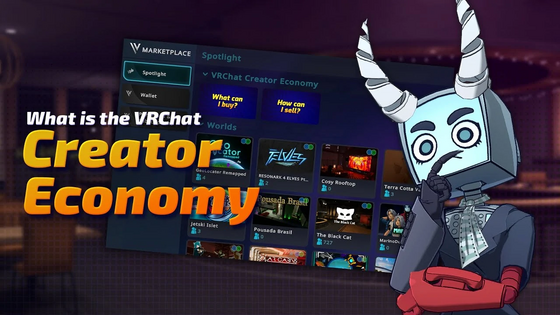
To be able to enroll in the Creator Economy Program, a user must have uploaded content and have access to the VRChat Creator Companion, and then apply to become a seller, as long as they are eligible:
Eligibility
- Be a User who is 18 years of age or older.
- Have a VRChat account that has been active for at least 30 days.
- Have a verified email address associated with your Account.
- Be a community member in good standing at all times while using the Platform, with no suspensions or bans from the Platform or the VRC Creator Economy in the last 90 days.
- Use the Platform in strict compliance with CE Rules, the Terms, the Community Guidelines, and the requirements set out in Creator Economy Program Rules Section 5.
- Not engage in any of the following activities: scamming, phishing, false advertising, attempting to exchange Credits for real currency other than through the Platform, or any illegal or unethical activities.
- Meet any other eligibility requirements that we or our CE Partner may establish from time to time in our or their sole discretion, including but not limited to:
- Having all applicable tax forms on file with the relevant CE Partner
- Completing any applicable CE Partner’s Know Your Customer registration, as required by such CE Partner
See here to view the full Creator Economy Program Rules.
Resources
- "Resources for Creator Economy" at creators.vrchat.com
- "Introducing the Creator Economy!" at hello.vrchat.com
- "Paid Subscriptions Beta" at hello.vrchat.com
- Introducing the Avatar Marketplace posted by VRChat, on YouTube
- Thunes' website at thunes.com
References
- ↑ VRChat Release 2023.4.2 from November 30, 2023.
- ↑ European Pricing Update for VRChat Plus/Credits from 24 May, 2024
- ↑ Creator Economy Documentation from 24 May, 2024
- ↑ youtube.com
- ↑ ask.vrchat.com


