Social/zh-hans: Difference between revisions
CharleyCat (talk | contribs) Created page with "描述" |
Updating to match new version of source page |
||
| (36 intermediate revisions by 2 users not shown) | |||
| Line 52: | Line 52: | ||
</div> | </div> | ||
|} | |} | ||
< | <span id="Pronouns"></span> | ||
=== | === 人称代词 === | ||
[[wikipedia:Pronoun|人称代词]]在简介中展示,以便让别的玩家知道该如何称呼ta们。在设定后,人称代词会在你的用户资料中显示,也会显示在你的[[Special:MyLanguage/Nameplates|名牌]]下方。 | |||
[[wikipedia:Pronoun| | |||
<gallery> | <gallery> | ||
Pronouns1.webp| | Pronouns1.webp|在网页上的用户资料显示 | ||
Pronouns3.webp| | Pronouns3.webp|在游戏中的用户资料显示 | ||
Pronouns2.webp| | Pronouns2.webp|在移动端的用户资料显示 | ||
</gallery> | </gallery> | ||
< | <span id="Bio"></span> | ||
=== | <div class="mw-translate-fuzzy"> | ||
=== 简介 === | |||
</div> | </div> | ||
简介是玩家编辑的一段文字,用于描述或介绍自己,也可用作其它用途。简介至多可以有500个字符。 | |||
目前,简介并不支持emoji表情及特殊字符(如分数)。部分被允许的特殊字符如下: | |||
๑ -༊ ༄․ೃ࿔ ೋ 彡ღ ͟͟͞ ೄྀ ͙༉ ¸୨୧、˒˒ ֒ ˗ˏˋ ˎˊ˗ ̤̮ ̤̥ ++ ˙· ˚ ∗ン ィ % ! ﹏ ? ? ζ ২ १ ୫ ૪ ໒ ৎ ຊ ຯ ೨ ໑ ७ ५ ୭ ˚ ·˖ ˸ જ Թ Ծ ౿ ੭ ୬ ෧ ୪ ১ ﹅﹆ ჲ ᴥ ફ ળ ਨ ৬ ৫ ২ ণ ଽ ︶ ଲ ମ 〄֍ 〧 ౾ ౽ 〨 ㆐ ︳ ㄔ ഒ * ٠ っ。̀ ́૭ ֊ ˙ ˶﹏ აପ ๑ଓ ଘ ∗ ੈ ᵕ ˘͈ ․. ༘ ̀ ́ ৻ づᴗʚïɞ૮ ˙˙ ඞ ༒ ໒ྀི ๑ ´ ˘ ` ྀི ʕω ʔ و ヮಡ ง¬༼︿༽ 亞ト丁してフ ̄_ఌ༅ ᆺ 〜 ༺ ༻ Ө Տ Ӈ ₳ เ ђ ς<!--Add other supported characters?--> | ๑ -༊ ༄․ೃ࿔ ೋ 彡ღ ͟͟͞ ೄྀ ͙༉ ¸୨୧、˒˒ ֒ ˗ˏˋ ˎˊ˗ ̤̮ ̤̥ ++ ˙· ˚ ∗ン ィ % ! ﹏ ? ? ζ ২ १ ୫ ૪ ໒ ৎ ຊ ຯ ೨ ໑ ७ ५ ୭ ˚ ·˖ ˸ જ Թ Ծ ౿ ੭ ୬ ෧ ୪ ১ ﹅﹆ ჲ ᴥ ફ ળ ਨ ৬ ৫ ২ ণ ଽ ︶ ଲ ମ 〄֍ 〧 ౾ ౽ 〨 ㆐ ︳ ㄔ ഒ * ٠ っ。̀ ́૭ ֊ ˙ ˶﹏ აପ ๑ଓ ଘ ∗ ੈ ᵕ ˘͈ ․. ༘ ̀ ́ ৻ づᴗʚïɞ૮ ˙˙ ඞ ༒ ໒ྀི ๑ ´ ˘ ` ྀི ʕω ʔ و ヮಡ ง¬༼︿༽ 亞ト丁してフ ̄_ఌ༅ ᆺ 〜 ༺ ༻ Ө Տ Ӈ ₳ เ ђ ς<!--Add other supported characters?--> | ||
< | <span id="Actions"></span> | ||
=== | === 操作 === | ||
在玩家的个人资料页下方有一些可执行的操作,它们会因是否为好友而不同。 | |||
[[File:UserProfile_UserActions.webp|thumb| | [[File:UserProfile_UserActions.webp|thumb|可对非好友执行的操作]] | ||
[[File:UserProfile_FriendActions.webp|thumb| | [[File:UserProfile_FriendActions.webp|thumb|可对好友执行的操作]] | ||
{| class="wikitable" | {| class="wikitable" | ||
! | !操作 | ||
! | !描述 | ||
|- | |- | ||
| | |加入<ref group="actions" name="friends-only">该操作只能对好友执行</ref> | ||
|<span lang="en" dir="ltr" class="mw-content-ltr">Joins the user's instance.</span> | |<span lang="en" dir="ltr" class="mw-content-ltr">Joins the user's instance.</span> | ||
|- | |- | ||
| | |请求加入<ref group="actions" name="friends-only"></ref> | ||
|<span lang="en" dir="ltr" class="mw-content-ltr">Sends the user a notification informing them that you would like to join their instance. The notification includes a customizable message and with [[Special:MyLanguage/VRC+|VRC+]] a photo can also be added to the notification.</span> | |<span lang="en" dir="ltr" class="mw-content-ltr">Sends the user a notification informing them that you would like to join their instance. The notification includes a customizable message and with [[Special:MyLanguage/VRC+|VRC+]] a photo can also be added to the notification.</span> | ||
|- | |- | ||
| | |发送邀请<ref group="actions" name="friends-only"></ref> | ||
|<span lang="en" dir="ltr" class="mw-content-ltr">Sends the user an invitation to join your instance. The invite includes a customizable message and with [[Special:MyLanguage/VRC+|VRC+]] a photo can also be added to the invitation.</span> | |<span lang="en" dir="ltr" class="mw-content-ltr">Sends the user an invitation to join your instance. The invite includes a customizable message and with [[Special:MyLanguage/VRC+|VRC+]] a photo can also be added to the invitation.</span> | ||
|- | |- | ||
|Boop<ref name="friends-only" group="actions" /> | |<span lang="en" dir="ltr" class="mw-content-ltr">Boop<ref name="friends-only" group="actions" /></span> | ||
|Sends the user a [[Boops|Boop]]. | |<span lang="en" dir="ltr" class="mw-content-ltr">Sends the user a [[Special:MyLanguage/Boops|Boop]].</span> | ||
|- | |- | ||
| | |赠送VRC+ | ||
|<span lang="en" dir="ltr" class="mw-content-ltr">Opens a menu that allows you to buy [[Special:MyLanguage/VRC+|VRC+]] for the user. ''See [[Special:MyLanguage/VRC+#Gifting|Gifting]] for more detailed information.''</span> | |<span lang="en" dir="ltr" class="mw-content-ltr">Opens a menu that allows you to buy [[Special:MyLanguage/VRC+|VRC+]] for the user. ''See [[Special:MyLanguage/VRC+#Gifting|Gifting]] for more detailed information.''</span> | ||
|- | |- | ||
| | |添加好友 | ||
|<span lang="en" dir="ltr" class="mw-content-ltr">Sends the user a friend request they can accept or decline.</span> | |<span lang="en" dir="ltr" class="mw-content-ltr">Sends the user a friend request they can accept or decline.</span> | ||
|- | |- | ||
| | |移除好友<ref group="actions" name="friends-only"></ref> | ||
|<span lang="en" dir="ltr" class="mw-content-ltr">Removes the user as a friend.</span> | |<span lang="en" dir="ltr" class="mw-content-ltr">Removes the user as a friend.</span> | ||
|- | |- | ||
| | |设置分组<ref group="actions" name="friends-only"></ref> | ||
|<span lang="en" dir="ltr" class="mw-content-ltr">Allows you to add the user to a list of favorite friends, like with avatars and worlds.</span> | |<span lang="en" dir="ltr" class="mw-content-ltr">Allows you to add the user to a list of favorite friends, like with avatars and worlds.</span> | ||
|- | |- | ||
| | |取消分组<ref group="actions" name="friends-only"></ref> | ||
|<span lang="en" dir="ltr" class="mw-content-ltr">Removes the user from your Favorite Friends list.</span> | |<span lang="en" dir="ltr" class="mw-content-ltr">Removes the user from your Favorite Friends list.</span> | ||
|- | |- | ||
| | |管理选项 | ||
|<span lang="en" dir="ltr" class="mw-content-ltr">Opens a menu that allows you to moderate the user by, for example, blocking them. ''See [[Special:MyLanguage/Trust and Safety#User Moderation tools|User Moderation tools]] for more detailed information.''</span> | |<span lang="en" dir="ltr" class="mw-content-ltr">Opens a menu that allows you to moderate the user by, for example, blocking them. ''See [[Special:MyLanguage/Trust and Safety#User Moderation tools|User Moderation tools]] for more detailed information.''</span> | ||
|- | |- | ||
| | |解除屏蔽 | ||
|<span lang="en" dir="ltr" class="mw-content-ltr">Unblocks a blocked user ''(Only shown for blocked users)''.</span> | |<span lang="en" dir="ltr" class="mw-content-ltr">Unblocks a blocked user ''(Only shown for blocked users)''.</span> | ||
|- | |- | ||
| | |添加备注 | ||
|<span lang="en" dir="ltr" class="mw-content-ltr">Allows you to attach a snippet of information to the user that only you can see, this can be used for anything. An example of the kind of information you could put in is how you met a user, any names they go by, or their username on other platforms.</span> | |<span lang="en" dir="ltr" class="mw-content-ltr">Allows you to attach a snippet of information to the user that only you can see, this can be used for anything. An example of the kind of information you could put in is how you met a user, any names they go by, or their username on other platforms.</span> | ||
|- | |- | ||
| | |邀请加入群组 | ||
|<span lang="en" dir="ltr" class="mw-content-ltr">Opens a menu that allows you to invite the user to a group, as long as you have the permissions required to do so. ''See [[Special:MyLanguage/Groups|Groups]] for more detailed information.''</span> | |<span lang="en" dir="ltr" class="mw-content-ltr">Opens a menu that allows you to invite the user to a group, as long as you have the permissions required to do so. ''See [[Special:MyLanguage/Groups|Groups]] for more detailed information.''</span> | ||
|- | |- | ||
| | |在网页中查看 | ||
|<span lang="en" dir="ltr" class="mw-content-ltr">Opens the user's profile on the {{VRC link|https://vrchat.com/home|VRChat Website}}.</span> | |<span lang="en" dir="ltr" class="mw-content-ltr">Opens the user's profile on the {{VRC link|https://vrchat.com/home|VRChat Website}}.</span> | ||
|} | |} | ||
<references group="actions"/> | <references group="actions"/> | ||
< | <span id="Uploaded_&_favorited_worlds"></span> | ||
=== | <div class="mw-translate-fuzzy"> | ||
=== 已上传及收藏的世界 === | |||
</div> | </div> | ||
在[[Special:MyLanguage/Social#Actions|操作]]下方会罗列该玩家上传的世界以及公开收藏的世界。它们可按照添加时间、最近更新、名称等排序。 | |||
< | <span id="Short_links"></span> | ||
=== | === 短链接 === | ||
用户资料可通过VRChat的<code>vrch.at</code>短链接域名附加用户ID分享,例如<code><nowiki>https://vrch.at/<userId></nowiki></code>。该链接重定向自VRChat网站上对应的用户资料页(<code><nowiki>https://vrchat.com/home/user/<userId></nowiki></code>)。 | |||
< | <span id="Social_menu"></span> | ||
== | <div class="mw-translate-fuzzy"> | ||
== 社交菜单 == | |||
</div> | </div> | ||
[[File:Social Menu.webp|thumb|alt= | [[File:Social Menu.webp|thumb|alt=VRChat主菜单中的社交页面截图|VRChat主菜单中的社交页面]] | ||
< | <span id="Friend_Locations"></span> | ||
=== | <div class="mw-translate-fuzzy"> | ||
=== 好友位置 === | |||
</div> | </div> | ||
'''好友位置'''包含了状态为在线(绿色)或欢迎加入(蓝色)且处于可加入房间(如公开、好友+、仅限好友、群组公开、群组+)的好友。在下方也会显示位于私人房间中的好友。 | |||
''' | |||
< | <span id="Group_Activity"></span> | ||
=== | <div class="mw-translate-fuzzy"> | ||
=== 群组房间 === | |||
</div> | </div> | ||
'''群组房间'''展示已加入群组的可用[[Special:MyLanguage/Groups|群组]]房间。如果你创建了类型为群组、群组+或群组公开的房间,该房间将会显示在对应群组所有成员的群组房间界面下。 | |||
''' | |||
< | <span id="All_Friends"></span> | ||
=== | <div class="mw-translate-fuzzy"> | ||
=== 全部好友 === | |||
</div> | </div> | ||
'''全部好友'''页面展示完整的在线好友列表,包含状态为忙碌(橙色)和请勿打扰(红色)的好友。它也包含在网页端活跃的好友和离线好友。 | |||
''' | |||
< | <span id="In_Instance"></span> | ||
=== | <div class="mw-translate-fuzzy"> | ||
=== 房内玩家 === | |||
</div> | </div> | ||
'''房内玩家'''展示当前处于同一房间的玩家。已屏蔽的玩家将不会显示在此处,除非你是房主或[[Special:MyLanguage/Groups|群组]]管理员。快捷菜单中的“当前房间”页面与此页面的功能相同。 | |||
''' | |||
< | <span id="Favorite_Friends"></span> | ||
=== | <div class="mw-translate-fuzzy"> | ||
=== 好友分组 === | |||
</div> | </div> | ||
'''好友分组'''提供了三个分组。你可以将好友分组至这三个组之一。组可以被重命名以便分类。 | |||
''' | |||
<div | <div class="mw-translate-fuzzy"> | ||
===Recently Seen=== | === Recently Seen === | ||
</div> | </div> | ||
'''Recently Seen'''页面显示你在房间中曾遇到的玩家。它展示了最近遇到的100名玩家,按照相遇时间排序。 | |||
'''Recently Seen''' | |||
< | <span id="Blocked"></span> | ||
=== | <div class="mw-translate-fuzzy"> | ||
=== 黑名单 === | |||
</div> | </div> | ||
'''黑名单'''中是你屏蔽的玩家。你可以点击任一玩家,并执行解除屏蔽操作。 | |||
''' | |||
< | <span id="Friends"></span> | ||
== | <div class="mw-translate-fuzzy"> | ||
== 好友 == | |||
</div> | </div> | ||
{{Stub|Add quirks that have to do with friends and such.}} | {{Stub|Add quirks that have to do with friends and such.}} | ||
与其它的平台类似,在VRChat中,好友是你信任的玩家。你可以查看玩家是否在线或在网页端活跃、发送及接受邀请、添加备注。在同一房间中的好友的名字会变成黄色,且该玩家的信誉级别也会包含好友前缀。 | |||
<div | <div class="mw-translate-fuzzy"> | ||
==Mutuals== | == Mutuals == | ||
<!-- Do we want a feature infobox? --> | <!-- Do we want a feature infobox? --> | ||
{{Infobox/Feature | {{Infobox/Feature | ||
| Line 242: | Line 220: | ||
</div> | </div> | ||
Mutuals功能允许玩家查看与其它玩家的共同好友或群组。 | |||
有两种方式查看mutuals,在快捷菜单或主菜单中会显示“View X Mutuals”按钮。在快捷菜单中,该按钮位于用户操作上方;在主菜单中,该按钮在右上角的举报按钮旁边。 | |||
<div | <div class="mw-translate-fuzzy"> | ||
如果你不希望别的玩家查看与你的共同好友或群组,或不希望自己出现在别的玩家的共同好友列表中,你可以关闭设置-舒适与安全-安全中的“Show Mutual Connections”。关闭该选项后,“View X Mutuals”按钮会变为“No Known Mutuals”。此外,当你出现在别的玩家的共同好友列表时,你的头像会被隐藏,用户名会被显示为“Hidden Mutual”。 | |||
</div> | </div> | ||
<div lang="en" dir="ltr" class="mw-content-ltr"> | <div lang="en" dir="ltr" class="mw-content-ltr"> | ||
==Discord Friends== | == Discord Friends == | ||
</div> | </div> | ||
<div lang="en" dir="ltr" class="mw-content-ltr"> | <div lang="en" dir="ltr" class="mw-content-ltr"> | ||
Seen in the Social tab under "All Friends", this feature allows you to see your Discord friends with their current status and to perform different actions. Friends with a Discord account linked will have a Discord icon displayed on their profile | Seen in the Social tab under "All Friends", this feature allows you to see your Discord friends with their current status and to perform different actions. Friends with a Discord account linked will have a Discord icon displayed on their profile | ||
</div> | </div> | ||
<div lang="en" dir="ltr" class="mw-content-ltr"> | <div lang="en" dir="ltr" class="mw-content-ltr"> | ||
| Line 267: | Line 241: | ||
<div lang="en" dir="ltr" class="mw-content-ltr"> | <div lang="en" dir="ltr" class="mw-content-ltr"> | ||
==References== | == References == | ||
<references/> | <references/> | ||
</div> | </div> | ||
Latest revision as of 02:43, 14 August 2026

VRChat为用户提供了许多社交工具,例如好友、邀请、备注等等!
用户资料

用户资料是一个用于展示用户的信息的个性化空间,从Identity Update中加入。用户资料中的信息包含状态、信誉级别、简介、当前位置/房间(如适用)、语言、链接、拥有的徽章、以及所在的群组。
在用户的资料下,你可以执行多种操作,例如添加好友或邀请进入房间。
状态
状态可在快捷菜单、主菜单或VRChat网站上设置,用于控制好友是否可以加入当前房间、决定好友是否可以查看当前所在的房间、开关通知,以及传递状态消息。
状态由颜色及可自定义的短句(至多32个字符)组成。在VRChat中有四种不同的状态:
| 状态 | 描述 |
|---|---|
| 欢迎加入(蓝色) | |
| 在线(绿色) | Your friends can see the instance you are in and can join your instance without an invitation. However, your friends may not see or join the instance without an invite if the instance is deemed "private". Your instance is viewable and joinable by friends without requesting an invite in the following cases:
|
| 忙碌(橙色) | Your friends cannot see the instance you are in. They must request an invite from you to be able to join, regardless of the instance's privacy. |
| 请勿打扰(红色) | Your friends cannot see the instance you are in. They may request to join, but you will not receive any notifications. In fact, you won't be able to send or request any invites to your friends within the game if they are in that status.
|
人称代词
人称代词在简介中展示,以便让别的玩家知道该如何称呼ta们。在设定后,人称代词会在你的用户资料中显示,也会显示在你的名牌下方。
-
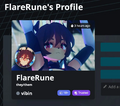 在网页上的用户资料显示
 -
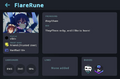 在游戏中的用户资料显示
 -
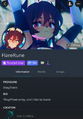 在移动端的用户资料显示


简介
简介是玩家编辑的一段文字,用于描述或介绍自己,也可用作其它用途。简介至多可以有500个字符。
目前,简介并不支持emoji表情及特殊字符(如分数)。部分被允许的特殊字符如下:
๑ -༊ ༄․ೃ࿔ ೋ 彡ღ ͟͟͞ ೄྀ ͙༉ ¸୨୧、˒˒ ֒ ˗ˏˋ ˎˊ˗ ̤̮ ̤̥ ++ ˙· ˚ ∗ン ィ % ! ﹏ ? ? ζ ২ १ ୫ ૪ ໒ ৎ ຊ ຯ ೨ ໑ ७ ५ ୭ ˚ ·˖ ˸ જ Թ Ծ ౿ ੭ ୬ ෧ ୪ ১ ﹅﹆ ჲ ᴥ ફ ળ ਨ ৬ ৫ ২ ণ ଽ ︶ ଲ ମ 〄֍ 〧 ౾ ౽ 〨 ㆐ ︳ ㄔ ഒ * ٠ っ。̀ ́૭ ֊ ˙ ˶﹏ აପ ๑ଓ ଘ ∗ ੈ ᵕ ˘͈ ․. ༘ ̀ ́ ৻ づᴗʚïɞ૮ ˙˙ ඞ ༒ ໒ྀི ๑ ´ ˘ ` ྀི ʕω ʔ و ヮಡ ง¬༼︿༽ 亞ト丁してフ ̄_ఌ༅ ᆺ 〜 ༺ ༻ Ө Տ Ӈ ₳ เ ђ ς
操作
在玩家的个人资料页下方有一些可执行的操作,它们会因是否为好友而不同。


| 操作 | 描述 |
|---|---|
| 加入[actions 1] | Joins the user's instance. |
| 请求加入[actions 1] | Sends the user a notification informing them that you would like to join their instance. The notification includes a customizable message and with VRC+ a photo can also be added to the notification. |
| 发送邀请[actions 1] | Sends the user an invitation to join your instance. The invite includes a customizable message and with VRC+ a photo can also be added to the invitation. |
| Boop[actions 1] | Sends the user a Boop. |
| 赠送VRC+ | Opens a menu that allows you to buy VRC+ for the user. See Gifting for more detailed information. |
| 添加好友 | Sends the user a friend request they can accept or decline. |
| 移除好友[actions 1] | Removes the user as a friend. |
| 设置分组[actions 1] | Allows you to add the user to a list of favorite friends, like with avatars and worlds. |
| 取消分组[actions 1] | Removes the user from your Favorite Friends list. |
| 管理选项 | Opens a menu that allows you to moderate the user by, for example, blocking them. See User Moderation tools for more detailed information. |
| 解除屏蔽 | Unblocks a blocked user (Only shown for blocked users). |
| 添加备注 | Allows you to attach a snippet of information to the user that only you can see, this can be used for anything. An example of the kind of information you could put in is how you met a user, any names they go by, or their username on other platforms. |
| 邀请加入群组 | Opens a menu that allows you to invite the user to a group, as long as you have the permissions required to do so. See Groups for more detailed information. |
| 在网页中查看 | Opens the user's profile on the VRChat Website. |
已上传及收藏的世界
在操作下方会罗列该玩家上传的世界以及公开收藏的世界。它们可按照添加时间、最近更新、名称等排序。
短链接
用户资料可通过VRChat的vrch.at短链接域名附加用户ID分享,例如https://vrch.at/<userId>。该链接重定向自VRChat网站上对应的用户资料页(https://vrchat.com/home/user/<userId>)。
社交菜单

好友位置
好友位置包含了状态为在线(绿色)或欢迎加入(蓝色)且处于可加入房间(如公开、好友+、仅限好友、群组公开、群组+)的好友。在下方也会显示位于私人房间中的好友。
群组房间
群组房间展示已加入群组的可用群组房间。如果你创建了类型为群组、群组+或群组公开的房间,该房间将会显示在对应群组所有成员的群组房间界面下。
全部好友
全部好友页面展示完整的在线好友列表,包含状态为忙碌(橙色)和请勿打扰(红色)的好友。它也包含在网页端活跃的好友和离线好友。
房内玩家
房内玩家展示当前处于同一房间的玩家。已屏蔽的玩家将不会显示在此处,除非你是房主或群组管理员。快捷菜单中的“当前房间”页面与此页面的功能相同。
好友分组
好友分组提供了三个分组。你可以将好友分组至这三个组之一。组可以被重命名以便分类。
Recently Seen
Recently Seen页面显示你在房间中曾遇到的玩家。它展示了最近遇到的100名玩家,按照相遇时间排序。
黑名单
黑名单中是你屏蔽的玩家。你可以点击任一玩家,并执行解除屏蔽操作。
好友

与其它的平台类似,在VRChat中,好友是你信任的玩家。你可以查看玩家是否在线或在网页端活跃、发送及接受邀请、添加备注。在同一房间中的好友的名字会变成黄色,且该玩家的信誉级别也会包含好友前缀。
Mutuals
Mutuals功能允许玩家查看与其它玩家的共同好友或群组。
有两种方式查看mutuals,在快捷菜单或主菜单中会显示“View X Mutuals”按钮。在快捷菜单中,该按钮位于用户操作上方;在主菜单中,该按钮在右上角的举报按钮旁边。
如果你不希望别的玩家查看与你的共同好友或群组,或不希望自己出现在别的玩家的共同好友列表中,你可以关闭设置-舒适与安全-安全中的“Show Mutual Connections”。关闭该选项后,“View X Mutuals”按钮会变为“No Known Mutuals”。此外,当你出现在别的玩家的共同好友列表时,你的头像会被隐藏,用户名会被显示为“Hidden Mutual”。
Discord Friends
Seen in the Social tab under "All Friends", this feature allows you to see your Discord friends with their current status and to perform different actions. Friends with a Discord account linked will have a Discord icon displayed on their profile
If your friend has linked their Discord account to their VRChat account, you will be able to invite them to join your instance through Discord. Otherwise, you will be able to invite them to create a VRChat account. You or your friends may prevent your VRChat account from being shown in the Discord section by turning off the "Allow Discord Friends" setting in the Comfort & Safety section of the settings.


