Reporting/fr: Difference between revisions
French Fox (talk | contribs) Created page with "Types" |
French Fox (talk | contribs) Created page with "Harcèlement, intimidation ou menaces" |
||
| Line 265: | Line 265: | ||
{| class="wikitable" | {| class="wikitable" | ||
!Types | !Types | ||
! | !Contenu sexuel | ||
! | !Harcèlement, intimidation ou menaces | ||
!<span lang="en" dir="ltr" class="mw-content-ltr">Hateful and discriminatory content</span> | !<span lang="en" dir="ltr" class="mw-content-ltr">Hateful and discriminatory content</span> | ||
!<span lang="en" dir="ltr" class="mw-content-ltr">Violence or gore</span> | !<span lang="en" dir="ltr" class="mw-content-ltr">Violence or gore</span> | ||
Revision as of 10:33, 5 March 2026


 " en haut à droite du menu rapide est utilisé pour signaler.
Le signalement est un outil utilisé pour signaler du contenu et un comportement inapproprié à l'équipe de modération de VRChat. La conduite est basé sur le règlement de la communauté et les conditions d'utilisation de VRChat. De plus, vous pouvez signaler des bugs et failles de sécurité à VRChat.
Vue d'ensemble
Le signalement est un procédé important qui assure la sécurité et l'expérience de jeu de tous les utilisateurs, contrairement au fait de bloquer qui n'affecte que votre expérience de jeu. Le processus de signalement est anonyme et les utilisateurs seront incapables de dire si un signalement a été émis par vous. De plus, afin de protéger la confidentialité des utilisateurs, les actions de modération ne seront pas révélées à l'émetteur du signalement.
Vous pouvez en apprendre plus sur les différentes méthodes et alternatives pour signaler dans l'article Confiance et sécurité, tels que masquer les avatars, désactiver le microphone d'un utilisateur, le mode sécurisé, ainsi que le bouton Monde d'accueil.
Signalement efficace
Le signalement en jeu est la méthode la plus utilisée pour signaler un contenu et comportement inapproprié. Si nécessaire, et afin d'apporter plus d'éléments utiles au signalement, l'équipe de développement de VRChat peut vous demander d'envoyer un signalement sur le site d'aide à help.vrchat.com. Apprenez en plus sur les signalement sur le site web de VRChat.
Dans un signalement efficace, les utilisateurs peuvent :
- Parcourir des ressources utiles via le site d'aide.
- Décrire la situation plus en détail
- En incluant ou étant spécifique sur le contenu ou l'utilisateur
- Attacher des éléments, tels que :
- Preuves photgraphiques
- Preuves vidéo
- Fichiers journaux (log)
Signaler du contenu
Signaler un utilisateur
- Je souhaite signaler quelqu'un - Site d'aide (anglais)
- Bloquer, débloquer, et signaler des utilisateurs dans VRChat - Site d'aide (anglais)
This should be selected to report objectionable language or actions of a user. A user can also be clicked on to report, mute, or block them. Any violation in regards to an avatar should be reported with the 'Reporting an Avatar' button.
| Types | Contenu sexuel | Harcèlement, intimidation ou menaces | Contenu haineux ou discriminatoire | Violence ou gore | Suicide et automutilation | Intégrité et authenticité | Exploitation et maltraitance d'enfant | Client modifié / Piratage | Droit d'auteur | Autre chose |
|---|---|---|---|---|---|---|---|---|---|---|
| Comportement | ✔️ | ✔️ | ✔️ | ✔️ | ✔️ | ✔️ | ✔️ | ✔️ | ❌ | ✔️ |
| Text Chat | ❌ | ❌ | ||||||||
| Images/icônes | ❌ | ✔️ | ||||||||
| Profil d'utilisateur | ❌ | ❌ |
Signaler un avatar
This option should be selected to report any content that is retained on an avatar. Clicking "View Avatar Details" after selecting a user, can be done to report an avatar. These options will also be presented for avatar favorites, as well as content on the Avatar Marketplace.
If there is uncertainty if the content violates Community Guidelines, please consider flagging a "Content Warnings" report when reporting the avatar instead.
| Types | Contenu sexuel | Harcèlement, intimidation ou menaces | Contenu haineux ou discriminatoire | Violence ou gore | Suicide et automutilation | Intégrité et authenticité | Exploitation et maltraitance d'enfant | Droit d'auteur | Avertissements de contenu | Autre chose |
|---|---|---|---|---|---|---|---|---|---|---|
| Contenu inapproprié sur l'avatar | ✔️ | ✔️ | ✔️ | ✔️ | ✔️ | ✔️ | ✔️ | ✔️ | ❌ | ✔️ |
| Information incorrecte ou inappropriée sur la page de l'avatar | ✔️ |
Signaler un groupe
This option should be selected to report a Group, or its content. Viewing a group's page will grant access to a Report button at the top-right.
| Types | Contenu sexuel | Harcèlement, intimidation ou menaces | Contenu haineux ou discriminatoire | Violence ou gore | Suicide et automutilation | Intégrité et authenticité | Exploitation et maltraitance d'enfant | Droit d'auteur | Autre chose |
|---|---|---|---|---|---|---|---|---|---|
| Groupe | ✔️ | ✔️ | ✔️ | ✔️ | ✔️ | ✔️ | ✔️ | ✔️ | ✔️ |
| Types | Facturation | Interruption du service | Annulation | Problème de sécurité | Renouvellement |
|---|---|---|---|---|---|
| Boutique du groupe | ✔️ | ✔️ | ✔️ | ✔️ | ✔️ |
Signaler un monde
This option should be selected to report any content that is retained within a world. Viewing a world's page grants access to a Report button. If there is uncertainty if the content violates Community Guidelines, please consider flagging a 'Content Warning' when reporting the world instead.
| Types | Contenu sexuel | Harcèlement, intimidation ou menaces | Contenu haineux ou discriminatoire | Violence ou gore | Suicide et automutilation | Intégrité et authenticité | Exploitation et maltraitance d'enfant | Droit d'auteur | Avertissements de contenu | Autre chose |
|---|---|---|---|---|---|---|---|---|---|---|
| Audio dans le monde | ✔️ | ✔️ | ✔️ | ✔️ | ✔️ | ✔️ | ✔️ | ✔️ | ❌ | ✔️ |
| Image dans le monde | ❌ | |||||||||
| Objet dans le monde | ❌ | |||||||||
| Page du monde | ✔️ | |||||||||
| IU/FX du monde | ❌ |
De plus, le contenu présenté dans la boutique d'un monde peut être signalé avec les faits suivants :
| Types | Facturation | Interruption du service | Annulation | Problème de sécurité | Renouvellement |
|---|---|---|---|---|---|
| Boutique du monde | ✔️ | ✔️ | ✔️ | ✔️ | ✔️ |
Signaler une instance
This option should be selected to report any content that is retained within a Instance. Viewing a instance page grants access to a Report button.
| Types | Contenu sexuel | Harcèlement, intimidation ou menaces | Contenu haineux ou discriminatoire | Violence ou gore | Suicide et automutilation | Intégrité et authenticité | Exploitation et maltraitance d'enfant | Autre chose |
|---|---|---|---|---|---|---|---|---|
| Texte | ✔️ | ✔️ | ✔️ | ✔️ | ✔️ | ✔️ | ✔️ | ✔️ |
Signaler un autocollant
This option should be selected to report any content that is retained within a sticker. You can also select a sticker in front of you to bring open a menu, allowing you to hide the sticker, or report it.
| Types | Contenu sexuel | Harcèlement, intimidation ou menaces | Hateful and discriminatory content | Violence or gore | Suicide and self-harm | Integrity and Authenticity | Child exploitation and abuse | Copyright | Something else |
|---|---|---|---|---|---|---|---|---|---|
| Sticker | ✔️ | ✔️ | ✔️ | ✔️ | ✔️ | ✔️ | ✔️ | ✔️ | ✔️ |
Reporting an emoji
This option should be selected to report any content that is retained within a emoji. You can also select a user in front of you to bring open a menu, allowing you to block them, or report them.
| Types | Sexual Content | Harassment, bullying, or threats | Hateful and discriminatory content | Violence or gore | Suicide and self-harm | Integrity and Authenticity | Child exploitation and abuse | Copyright | Something else |
|---|---|---|---|---|---|---|---|---|---|
| Emoji | ✔️ | ✔️ | ✔️ | ✔️ | ✔️ | ✔️ | ✔️ | ✔️ | ✔️ |
Reporting a print
This option should be selected to report any content that is retained within a print. You can also select a print in front of you to bring open a menu, allowing you to hide the print, or report it.
| Types | Sexual Content | Harassment, bullying, or threats | Hateful and discriminatory content | Violence or gore | Suicide and self-harm | Integrity and Authenticity | Child exploitation and abuse | Copyright | Something else |
|---|---|---|---|---|---|---|---|---|---|
| ✔️ | ✔️ | ✔️ | ✔️ | ✔️ | ✔️ | ✔️ | ✔️ | ✔️ |
Successful Reports
Upon successful action, on a report you had submitted previously, a notification in the "Other" tab will appear informing you.
Reports text visually changes depending on the Type of successful report, A User reports will display User, Group reports will mention "Groups". However responses received by email are omissive not informing users if it was group/user or world that was sucessful, just that it was successful.
-
 The in-app notification displaying sucessful moderation case close.
 -
 The website notification of a moderation report being complete.
 -
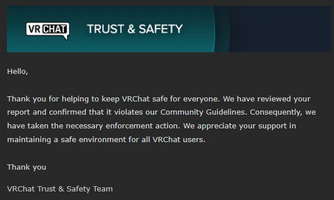 The email report may show which guidelines were broken inside of your moderation ticket response. (Wording will vary based on violation type.)


Reporting on the VRChat website
In addition to being able to report within the VRChat client, you can optionally report any content on the VRChat website. From there, you may also attach your relevant user logs, screenshots, and any short video footage within the ticket. An e-mail acknowledging your report, will be sent to the same e-mail address you submitted within the ticket. However, results of moderation action will not be disclosed to the reporter.
Reporting a security exploit
The VRChat website should be used to report security exploits for VRChat or its services. It is requested that the inclusion of "proof-of-concept, documentation, background, attack scenarios, potential mitigations, etc." are ideal, and that "video, screenshots, chat logs, hearsay, etc alone are not useful and do not constitute an exploit disclosure".
Reporting a bug
For additional information, see also Guides:How to write efficient bug reports
You cannot report bugs directly within the game, but you can submit bug reports pseudonymously on feedback.vrchat.com if you have a VRChat account. The platform uses a ticketing system powered by Canny.io, while VRChat employs a separate internal system to manage and track tickets.
Template for reports[2]
1. Summary
> Explain in 2-3 Sentence what this report is about.
VRChat crashed when trying to join a friend.

2. Steps to reproduce the bug:
> Write down what you did step by step so someone else can see the problem. For example:
  1. Open Main Menu
  2. Visit any Profile
  3. Double Click "Join" Button

3. What did you expect to happen?
> Explain what you thought would happen. For example:
To join my friends.

4. What actually happened?
> Explain what went wrong. For example:
VRChat crashed.

X. Additional details (if any):
> Add any other information. For example:
* Logs (`%appdata%\..\LocalLow\VRChat\VRChat\`, need to be uploaded external)
* Video (up to 8MB, or can be uploaded externally, upload on YouTube)
* Screenshots (up to 8MB, or can be uploaded externally)
* Links
Official resources
Help website resources
Help website articles
See also
Rules and Guidelines
VRChat platform articles
References
- ↑ Tupper…? on YouTube.
- ↑ What a Bug Report needs - Q&A Team StormRel


