Avatar Marketplace/es: Difference between revisions
Created page with "== Descripción general == El Avatar Marketplace permite a los usuarios comprar y utilizar avatares de creadores de forma nativa dentro de VRChat, simplificando el proceso en comparación con las plataformas de terceros. Los avatares comprados pueden utilizarse inmediatamente sin necesidad de subirlos mediante Unity o el SDK de VRChat." |
Created page with "Al seleccionar el acceso rápido '''Avatares''' en el Menú Rápido, se abre la pestaña de Avatares en el Menú Principal, mostrando por defecto la sección '''Explorar'''. Esta sección incluye tanto avatares públicos gratuitos como avatares de pago disponibles a través del Marketplace." |
||
| Line 10: | Line 10: | ||
El Avatar Marketplace permite a los usuarios comprar y utilizar avatares de creadores de forma nativa dentro de VRChat, simplificando el proceso en comparación con las plataformas de terceros. Los avatares comprados pueden utilizarse inmediatamente sin necesidad de subirlos mediante Unity o el [[Special:MyLanguage/VRChat SDK|SDK de VRChat]]. | El Avatar Marketplace permite a los usuarios comprar y utilizar avatares de creadores de forma nativa dentro de VRChat, simplificando el proceso en comparación con las plataformas de terceros. Los avatares comprados pueden utilizarse inmediatamente sin necesidad de subirlos mediante Unity o el [[Special:MyLanguage/VRChat SDK|SDK de VRChat]]. | ||
Al seleccionar el acceso rápido '''Avatares''' en el [[Special:MyLanguage/Quick Menu|Menú Rápido]], se abre la pestaña de Avatares en el [[Special:MyLanguage/Main Menu|Menú Principal]], mostrando por defecto la sección '''Explorar'''. Esta sección incluye tanto [[Special:MyLanguage/Public Avatars|avatares públicos]] gratuitos como avatares de pago disponibles a través del Marketplace. | |||
<!--It will need to be noted that the '''Marketplace''' tab in the Main Menu will likely do the same thing; this still needs to be implemented, and will likely be available before AVM goes live. Remove this comment when the Marketplace tab gets mentioned. ~DAG-XR (05.25.2025)--> | <!--It will need to be noted that the '''Marketplace''' tab in the Main Menu will likely do the same thing; this still needs to be implemented, and will likely be available before AVM goes live. Remove this comment when the Marketplace tab gets mentioned. ~DAG-XR (05.25.2025)--> | ||
Revision as of 19:46, 30 July 2026

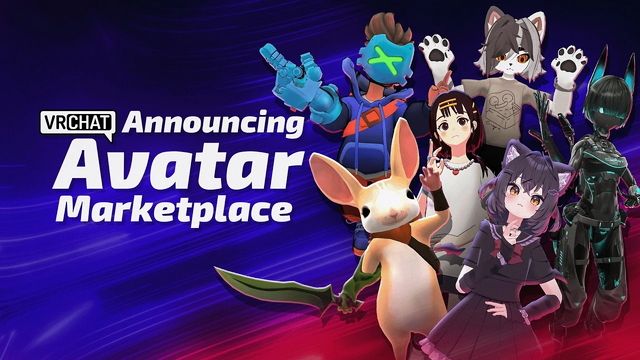
Avatar Marketplace (AVM) es una función de la Economía de Creadores de VRChat que proporciona una plataforma para que los creadores vendan avatares de pago directamente dentro de VRChat utilizando Créditos VRC.
Descripción general
El Avatar Marketplace permite a los usuarios comprar y utilizar avatares de creadores de forma nativa dentro de VRChat, simplificando el proceso en comparación con las plataformas de terceros. Los avatares comprados pueden utilizarse inmediatamente sin necesidad de subirlos mediante Unity o el SDK de VRChat.
Al seleccionar el acceso rápido Avatares en el Menú Rápido, se abre la pestaña de Avatares en el Menú Principal, mostrando por defecto la sección Explorar. Esta sección incluye tanto avatares públicos gratuitos como avatares de pago disponibles a través del Marketplace.
Product listings

Each avatar listing includes images, a preview of the base model and impostor (if available), a description, price, file size, upload date, performance ranking, and relevant tags. Listings also show avatar features such as platform compatibility, visemes, eye look support, Impostors, and performance breakdowns. Avatars can also be previewed locally before purchase, only the user will see the avatar during this preview.
Purchasing avatars
Purchasing an avatar with the Avatar Marketplace requires sufficient VRChat Credits on your account's wallet before an avatar is bought. Users on Steam, and Meta systems are currently able to purchase credits[1] at a minimum quantity of 600, up to a maximum of 12,000 per purchase.
When a user has sufficient credits, they can purchase an avatar, which becomes bound to their VRChat account. Users are not yet able to purchase avatars for other users, or have the ability to download or modify their purchased avatar(s) using the VRChat SDK.
Selling on the Avatar Marketplace

See also: Enrolling in the Creator Economy for more detailed information.
Creators interested in selling avatars on the Avatar Marketplace, are required to review the Creator Economy Program terms and conditions[2], and must submit an enrollment application to be reviewed by VRChat, and approved.

It should be noted that the Creator Economy program for worlds and groups is separate from the Avatar Marketplace program and must be applied for separately, even if the creator is already in Creator Economy for worlds and groups.
Resources
- "Resources for Creator Economy" at creators.vrchat.com
- "Creator Guidelines" at hello.vrchat.com
- Introducing the Avatar Marketplace posted by VRChat, on YouTube
- "Avatar Marketplace FAQ" at help.vrchat.com
- "Avatar Marketplace FAQ for Sellers" at ask.vrchat.com
- "Avatar Marketplace Help" at help.vrchat.com
- Thunes' website at thunes.com
See also
References
- ↑ 'Creator Economy: Frequently Asked Questions' on help.vrchat.com; retrieved May 25, 2025.
- ↑ 'Creator Economy Program Rules' on hello.vrchat.com; retrieved May 25, 2025.


