Avatar Marketplace/de: Difference between revisions
Created page with "== Übersicht == Der Avatar Marketplace ermöglicht es Nutzern, Avatare von Creatoren direkt innerhalb von VRChat zu kaufen und zu verwenden. Dadurch wird der Vorgang im Vergleich zu Drittanbieterplattformen vereinfacht. Gekaufte Avatare können sofort verwendet werden, ohne sie zuvor über Unity oder das VRChat SDK hochladen zu müssen." |
Created page with "Durch Auswahl des Schnelllinks '''Avatare''' im Schnellmenü wird der Avatar-Tab im Hauptmenü geöffnet, wobei standardmäßig der Abschnitt '''Entdecken''' angezeigt wird. Dieser Abschnitt umfasst sowohl kostenlose öffentliche Avatare als auch kostenpflichtige Avatare, die über den Avatar-Marktplatz erhältlich sind." |
||
| Line 9: | Line 9: | ||
Der Avatar Marketplace ermöglicht es Nutzern, Avatare von Creatoren direkt innerhalb von VRChat zu kaufen und zu verwenden. Dadurch wird der Vorgang im Vergleich zu Drittanbieterplattformen vereinfacht. Gekaufte Avatare können sofort verwendet werden, ohne sie zuvor über Unity oder das [[Special:MyLanguage/VRChat SDK|VRChat SDK]] hochladen zu müssen. | Der Avatar Marketplace ermöglicht es Nutzern, Avatare von Creatoren direkt innerhalb von VRChat zu kaufen und zu verwenden. Dadurch wird der Vorgang im Vergleich zu Drittanbieterplattformen vereinfacht. Gekaufte Avatare können sofort verwendet werden, ohne sie zuvor über Unity oder das [[Special:MyLanguage/VRChat SDK|VRChat SDK]] hochladen zu müssen. | ||
Durch Auswahl des Schnelllinks '''Avatare''' im [[Special:MyLanguage/Quick Menu|Schnellmenü]] wird der Avatar-Tab im [[Special:MyLanguage/Main Menu|Hauptmenü]] geöffnet, wobei standardmäßig der Abschnitt '''Entdecken''' angezeigt wird. Dieser Abschnitt umfasst sowohl kostenlose [[Special:MyLanguage/Public Avatars|öffentliche Avatare]] als auch kostenpflichtige Avatare, die über den Avatar-Marktplatz erhältlich sind. | |||
<!--It will need to be noted that the '''Marketplace''' tab in the Main Menu will likely do the same thing; this still needs to be implemented, and will likely be available before AVM goes live. Remove this comment when the Marketplace tab gets mentioned. ~DAG-XR (05.25.2025)--> | <!--It will need to be noted that the '''Marketplace''' tab in the Main Menu will likely do the same thing; this still needs to be implemented, and will likely be available before AVM goes live. Remove this comment when the Marketplace tab gets mentioned. ~DAG-XR (05.25.2025)--> | ||
Revision as of 11:48, 29 November 2026

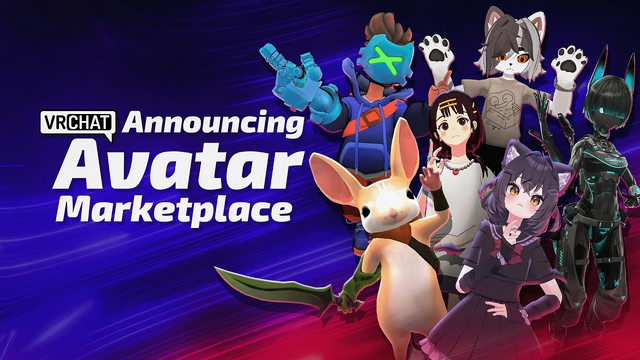
Avatar Marketplace (AVM) ist eine Funktion der Creator Economy von VRChat, die Creatoren eine Plattform bietet, um monetarisierte Avatare direkt innerhalb von VRChat mithilfe von VRC Credits zu verkaufen.
Übersicht
Der Avatar Marketplace ermöglicht es Nutzern, Avatare von Creatoren direkt innerhalb von VRChat zu kaufen und zu verwenden. Dadurch wird der Vorgang im Vergleich zu Drittanbieterplattformen vereinfacht. Gekaufte Avatare können sofort verwendet werden, ohne sie zuvor über Unity oder das VRChat SDK hochladen zu müssen.
Durch Auswahl des Schnelllinks Avatare im Schnellmenü wird der Avatar-Tab im Hauptmenü geöffnet, wobei standardmäßig der Abschnitt Entdecken angezeigt wird. Dieser Abschnitt umfasst sowohl kostenlose öffentliche Avatare als auch kostenpflichtige Avatare, die über den Avatar-Marktplatz erhältlich sind.
Product listings

Each avatar listing includes images, a preview of the base model and impostor (if available), a description, price, file size, upload date, performance ranking, and relevant tags. Listings also show avatar features such as platform compatibility, visemes, eye look support, Impostors, and performance breakdowns. Avatars can also be previewed locally before purchase, only the user will see the avatar during this preview.
Purchasing avatars
Purchasing an avatar with the Avatar Marketplace requires sufficient VRChat Credits on your account's wallet before an avatar is bought. Users on Steam, and Meta systems are currently able to purchase credits[1] at a minimum quantity of 600, up to a maximum of 12,000 per purchase.
When a user has sufficient credits, they can purchase an avatar, which becomes bound to their VRChat account. Users are not yet able to purchase avatars for other users, or have the ability to download or modify their purchased avatar(s) using the VRChat SDK.
Selling on the Avatar Marketplace

See also: Enrolling in the Creator Economy for more detailed information.
Creators interested in selling avatars on the Avatar Marketplace, are required to review the Creator Economy Program terms and conditions[2], and must submit an enrollment application to be reviewed by VRChat, and approved.

It should be noted that the Creator Economy program for worlds and groups is separate from the Avatar Marketplace program and must be applied for separately, even if the creator is already in Creator Economy for worlds and groups.
Resources
- "Resources for Creator Economy" at creators.vrchat.com
- "Creator Guidelines" at hello.vrchat.com
- Introducing the Avatar Marketplace posted by VRChat, on YouTube
- "Avatar Marketplace FAQ" at help.vrchat.com
- "Avatar Marketplace FAQ for Sellers" at ask.vrchat.com
- "Avatar Marketplace Help" at help.vrchat.com
- Thunes' website at thunes.com
See also
References
- ↑ 'Creator Economy: Frequently Asked Questions' on help.vrchat.com; retrieved May 25, 2025.
- ↑ 'Creator Economy Program Rules' on hello.vrchat.com; retrieved May 25, 2025.


