Creator-Wirtschaft

Creator-Wirtschaft ist ein von VRChat eingeführter Dienst, der es Nutzern ermöglicht, „VRChat Credits“ zu erwerben, um ihre bevorzugten Creator zu unterstützen. Creator können außerdem einen eigenen Shop einrichten, sofern sie sich für das Creator-Wirtschaftsprogramm bewerben und angenommen werden. Alle Transaktionen werden über den VRChat-Partner [1] abgewickelt, ehemals bekannt als Tilia.
Dieser Dienst wurde während des Entwickler-Streams von VRChat im April 2021 angekündigt, und die erste Testphase startete in der öffentlichen Beta am 22. November 2023 und wurde schließlich am 30. November 2023 öffentlich veröffentlicht.[1]
VRChat-Guthaben

 VRChat Credits (im Klartext durch ein \V-Symbol dargestellt), VRC Credits oder einfach Guthaben bezeichnen eine digitale Währung, die VRChat-Nutzer bei anderen VRChat-Creatorn gegen Vorteile eintauschen können. VRChat Credits können über den Steam Store, den Meta Store oder den Google Play Store erworben werden.
Kauf

Nutzer können VRChat Credits kaufen, indem sie ihr Hauptmenü oder Schnellmenü öffnen und oben rechts auf die Schaltfläche Wallet klicken.
Es gibt 9 verschiedene VRChat-Credits-Pakete, die erworben werden können und von 600 bis 12,000 reichen. Nutzer müssen über ausreichendes Guthaben im Steam Store oder Meta Store verfügen, je nachdem, wo die Credits gekauft werden. Nach Abschluss der Transaktion werden die Credits sofort dem Konto gutgeschrieben.
VRChat-Guthabenpakete
| VRChat-Guthaben
|
Wert
($USD) |
Bild |
|---|---|---|
| 600 | 4,99 | 
|
| 1,200 | 9,99 | 
|
| 2,400 | 19,99 | 
|
| 3,000 | 24,99 | 
|
| 3,600 | 29,99 | 
|
| 4,800 | 39,99 | 
|
| 6,000 | 49,99 | 
|
| 9,000 | 74,99 | 
|
| 12,000 | 99,99 | 
|
Beim Kauf von Credits kann Mehrwertsteuer (MwSt.) anfallen.[2]
Ausgeben
Nutzer können ihre VRChat Credits auf der Website oder im Client über den Shop sowie die Shops für Avatare, Gruppen oder Welten ausgeben. Nutzer können mit ihren VRChat Credits Angebote oder Abonnements erwerben. Jedem Angebot und jedem Abonnement sind Produkte zugeordnet, die vereinfacht ausgedrückt die Vorteile darstellen, die man durch das jeweilige Angebot oder Abonnement erhält.
Der Abschnitt Spotlight im Marketplace-Tab bietet Vorschläge für Welten und Gruppen, die derzeit am Creator-Wirtschaftsprogramm teilnehmen.
Weitere Informationen zu Creatorn finden sich in der Dokumentation zur Creator-Wirtschaft[3].
Shops
Shops sind Bereiche, in denen Nutzer Inhalte mit VRChat Credits erwerben können. Es gibt 3 Arten von Shops:
| Shops | Beschreibung |
|---|---|
| Avatar-Marktplatz | Nutzer können hier alle öffentlichen Avatar-Angebote finden. Der Bereich befindet sich auf der Avatar-Seite im Tab „Entdecken“. |
| Welt | Befindet sich auf einer Weltseite im Tab „Shop“. Nutzer können dort Inhalte für die Welt erwerben, in der sie sich gerade befinden, oder Avatar-Angebote kaufen. |
| Gruppe | Befindet sich auf einer Gruppenseite im Tab „Shop“. Nutzer können dort Abonnements erwerben, die ihnen Zugriff auf Inhalte in verschiedenen Welten oder eine Gruppenrolle gewähren können. |
Angebote
Angebote sind Inhalte, die Nutzer in Shops erwerben können. Creator können selbst bestimmen, welche Arten von Angeboten sie bereitstellen. Zu den gängigen Angeboten gehören beispielsweise das Freischalten neuer Bereiche einer Welt, Anpassungsmöglichkeiten und vieles mehr.
Es gibt 3 Arten von Angeboten, die Creator bereitstellen können. Jede Art hat eine unterschiedliche Laufzeit.
| Angebot | Dauer | Beschreibung |
|---|---|---|
| Sofort | None | Users can purchase this type as many times as they want. Benefits are instantly awarded. This type is only purchasable if you are in the world. |
| Temporary | 5 minutes - 3 months | Users can purchase this type as many times as they want but can't repurchase until its duration expires. Benefits earned are only available until its duration expires. |
| Permanent | Unlimited | Users can only purchase this type once. Benefits are permanently available to the buyer. |
Subscriptions
Subscriptions are the type of listing that users can buy from group stores. While listings can be anything the world creator decides, users can expect to see common types of listing such as: VIP access.
Users have 4 default duration options, they can choose from when buying a subscription.
- 1 month
- 3 months
- 6 months
- 12 months
There is also a custom duration option users can choose, which ranges from 1 month to 99 months. Subscriptions do not automatically renew.
When a user buys a subscription, they will be automatically added to the group they bought the subscription from. Buyers will also a group role, which creators can offer group specific benefits.
Products
When users buy listings or subscriptions, they contain products (also referred to as "Benefits" in-game). Each listing or subscription can contain multiple products. Products have 3 types:
| Product type | Limitations | Description |
|---|---|---|
| Avatar |
|
Users receive said avatar in the Purchased tab of their My Avatars page on the Avatars page. |
| Subscription Role |
|
Users receive a role in the group they bought the subscription in. It may grant additional group permissions such as access to viewing group posts, instances and/or priority queues. |
| Udon |
|
Users receive benefits in the world they bought the listing in. Common types of benefits include: VIP access, cosmetics, items, etc. |
Viewing transaction history
To view the history of your transactions, navigate to the Marketplace page on the Main Menu, proceed to the Wallet section, and then choose the Transactions tab. Alternatively, you can view it on the VRChat website.
The Transactions tab shows the history of the user's VRChat Credits on their account. Listing the name of the product, the amount of credits, the remaining balance after the purchase, the recipient, the date of purchase, and the type of transaction.
To view your purchases or active and expired subscriptions, navigate to the Purchases & Subscriptions tab of the Marketplace page.
The Purchases tab lists any listing you bought, including its type, date of purchase and expiration, and details. While, the Subscriptions tab includes the same details as the Purchases tab, just instead for subscriptions. It is split up by an "Active" and "Expired" dropdown, and also includes an option to renew the subscription or cancel it.
Avatar Marketplace
See also: Avatar Marketplace for more detailed information.
The Avatar Marketplace is a feature announced by VRChat on 14. Mai 2025[4][5], as an expansion of the Creator Economy. This update introduces a native system for selling and buying avatars directly within VRChat using VRChat Credits.
With the Avatar Marketplace, users can purchase avatars that are automatically added to their VRChat account without the need to manually upload avatars through Unity. Purchased avatars are permanently accessible to the buyer outside of extraordinary circumstances.
Avatars listed on the marketplace can be locally previewed before purchase, meaning the avatar is only visible to the user while using the try-on feature.
The Avatar Marketplace update adds three new upper tabs to the Avatars tab in the Main Menu. The Explore tab lets a user search for avatars for sale in the Marketplace, as well as varying categories of avatars for sale. The My Avatars tab utilizes the traditional avatar menu, with your uploaded avatars, favorited avatars, as well as a new section for "Purchased" avatars from the marketplace. Lastly, the My Current Avatar tab shows the avatar details of an avatar that you are currently wearing.
Users interested in selling avatars on the Avatar Marketplace need to enroll in VRChat's Creator Economy Program for approval.
Enrolling in the Creator Economy Program
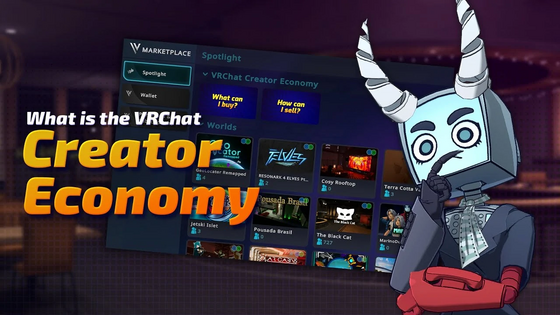
To be able to enroll in the Creator Economy Program, a user must have uploaded content and have access to the VRChat Creator Companion, and then apply to become a seller, as long as they are eligible:
Eligibility
- Be a User who is 18 years of age or older.
- Have a VRChat account that has been active for at least 30 days.
- Have a verified email address associated with your Account.
- Be a community member in good standing at all times while using the Platform, with no suspensions or bans from the Platform or the VRC Creator Economy in the last 90 days.
- Use the Platform in strict compliance with CE Rules, the Terms, the Community Guidelines, and the requirements set out in Creator Economy Program Rules Section 5.
- Not engage in any of the following activities: scamming, phishing, false advertising, attempting to exchange Credits for real currency other than through the Platform, or any illegal or unethical activities.
- Meet any other eligibility requirements that we or our CE Partner may establish from time to time in our or their sole discretion, including but not limited to:
- Having all applicable tax forms on file with the relevant CE Partner
- Completing any applicable CE Partner’s Know Your Customer registration, as required by such CE Partner
See here to view the full Creator Economy Program Rules.
Resources
- "Resources for Creator Economy" at creators.vrchat.com
- "Introducing the Creator Economy!" at hello.vrchat.com
- "Paid Subscriptions Beta" at hello.vrchat.com
- Introducing the Avatar Marketplace posted by VRChat, on YouTube
- Thunes' website at thunes.com
References
- ↑ VRChat-Version 2023.4.2 vom 30. November 2023.
- ↑ European Pricing Update for VRChat Plus/Credits vom 24. Mai 2024
- ↑ Creator Economy Documentation vom 24. Mai 2024
- ↑ youtube.com
- ↑ ask.vrchat.com


