Guides:How to edit and create VRChat Wiki pages
Reading this article will help you understand how to edit, and create pages on the VRChat Wiki. If you don't know where to begin, this guide can help you learn the basics. For any further questions, feel free to ask in the VRChat Wiki Discord server, or within the Discussion thread for this page.
Log in to make any edits
-
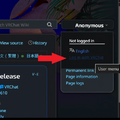 Logging into the VRChat Wiki with your VRChat account, on a desktop web browser.
 -
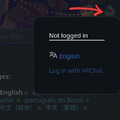 Logging into the VRChat Wiki with your VRChat account, on a smartdevice web browser.


In order to make any edits to a page, or create a new page, or contribute to a discussion page, first, you must log in with your VRChat account.
At the top right of any VRChat Wiki webpage, will either be a 'person' icon for mobile-formatted web browsers that states "Not logged in", or a block that says "Anonymous" on desktop-formatted web browsers. If the text, instead displays your VRChat username, then you are already logged in. If not, click "Log in with VRChat" and then proceed to enter your username and password.
How to edit a page
-
 The edit buttons on a VRChat Wiki page, for a desktop web browser.
 -
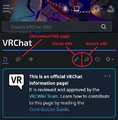 The edit buttons on a VRChat Wiki page, for a smartdevice web browser.
 -
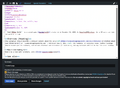 A demonstration of 'source editing' for a VRChat Wiki page.


Editing pages with relevant information is crucial to the upkeep of any knowledgebase. We encourage users like you, to edit pages that may need a change. You can either choose between "visual editing", or "source editing"; you can also switch between both editing styles during your edit period, before submitting changes.
Most changes go into affect immediately, except for any official VRChat content pages, where your edit might need moderator approval after you submit the information. The change will take a bit of time to be seen.
Discussion pages
Discussion pages, or 'talk pages' are subpages, where VRChat Wiki users can ask questions or talk with others on subjects pertaining to the article.
How to create a new page

When searching for any content within the search bar, at the top of the page, the content you are searching for might not have an article! Before creating a page, a subject might first require a "namespace" within the search bar. For example, you might receive a result when typing Community:The Black Cat, versus simply "The Black Cat".
If you are certain that there is notable content missing from the VRChat Wiki, you can do so by creating a page! In order to create a page, you will have to type the name of your proposed article into the search bar, and then enter. This will bring open a page that states:
There were no results matching the query.
Create the page "[Your text here!]" on this wiki!
When clicking on the red link of text that you submit, this will begin the process in creating a new page. Make certain that you do not have any Conflicts of interest associated with the content that you are about to create a page for. Utilize the Manual of Style to your best ability when making edits to the new article.
Adding noticeboxes can also help with the minimum for getting a page started.
Some examples include:

The "Community" noticebox, for VRChat content, created by community members.

The "Official" noticebox, reserved for official VRChat, Inc. content, features, events, et al.

[Reason: You can contribute by expanding and proofreading this article, in accordance with the Manual of Style.]
The "Stub" noticebox, placed on new pages, needing additional or unfinished content.


